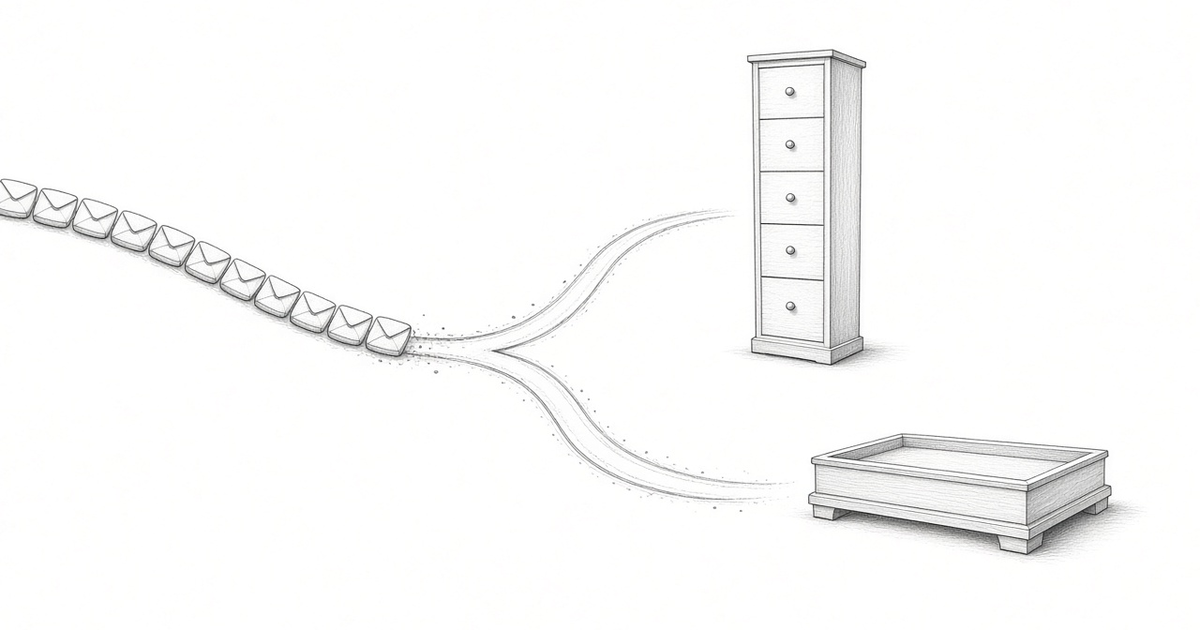
Many people new to vertical slice architecture and CQRS make the same mistake: they only think of shared read models, or of one canonical read model that every screen reads from. But to keep things really loosely coupled, or not coupled at all, every single use case gets its own read model. Read models are cheap to make, and this way, if I have to change one use case, it never has side effects on anything else.
In Slices, not services I named the four building blocks of an Event Model: state change, state view, automation and translation. In One slice, end to end I traced one state change, cancelling a life policy during its cooling-off period, from the model to the code. I left something out on purpose. The "Cancel policy" screen shows the policy number and the date the cooling-off period ends. Those values come from a neighbouring state-view slice, "Policy details". This article builds it, and a second state view next to it that reads the very same events.
The views in the model
In an Event Model, a state view carries facts to a screen: events feed a read model, and the read model feeds the screen. It doesn't decide anything. It answers one question for one use case.
There are two such questions about cancellations. The cancel screen needs one policy: its number, its deadline, and whether to show the button at all. That's "Policy details". The operations team needs a list of every cooling-off cancellation, with the reason and how many days into the window it came. That's "Cooling-off cancellations", and it looks like this in the model:
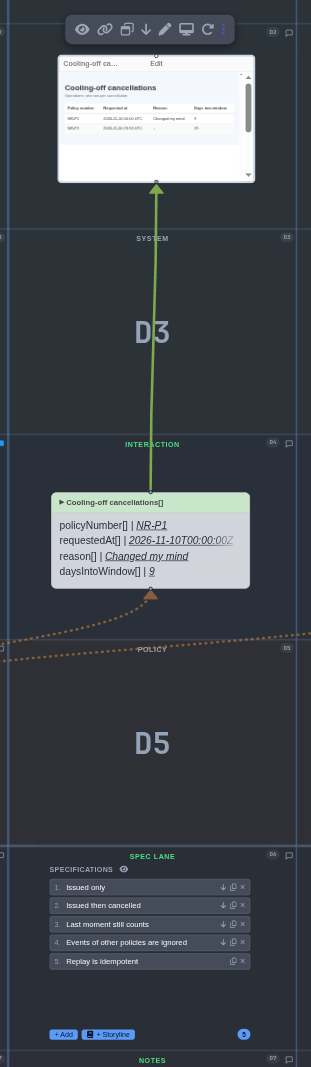
The Cooling-off cancellations slice, modelled with Martin Dilger's agentic Event Modeling tool, app.eventmodelers.ai.
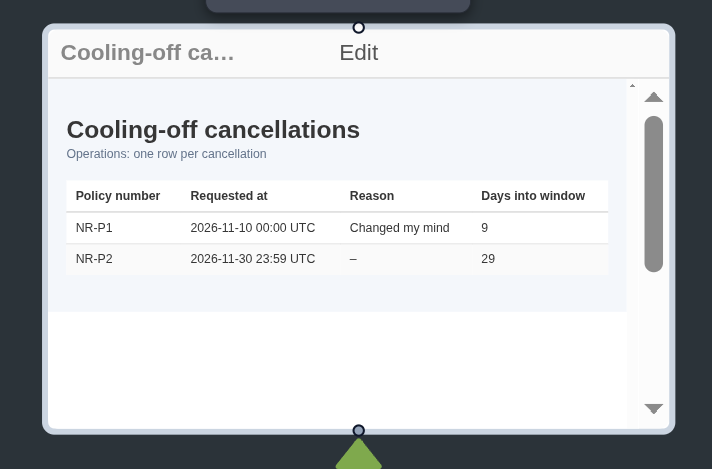
The ops screen from the same slice, up close.
The first picture shows the ops screen at the top, the read model below it with policyNumber, requestedAt, reason and daysIntoWindow, and the five scenarios in the spec lane. The close-up shows the screen itself: one row per cancellation, with exactly those four values. The event that feeds the read model, PolicyCancelledInCoolingOff, sits outside the first picture. The policy number, and the issue date the day count needs, come from the policy's PolicyIssued event.
The canonical read model trap
For years we designed one schema per system, with one policies table that every part of the application reads. When people move to CQRS, they split writes from reads, but they keep that habit on the read side: one rich "policy" read model, and every screen queries it.
That model doesn't stay small. Each new screen adds columns with their own rules, and after a while nobody dares to change it, because nobody knows which screen depends on which field. That's the coupling we removed on the write side, back on the read side.
I learned this the hard way. We once had to add a new field to an address DTO. Simple enough, we thought. But 20 different use cases used that same DTO, so we refactored all 20 and then fixed the defects that had slipped unnoticed into production. We learned that reuse is probably not the best thing to do when it ties use cases together, and a shared read model does exactly that.
Two views in the code
Both views draw on the same two events. Instead of one shared table, each view in the model gets its own folder, its own table and its own code:
PolicyDetails/
  PolicyDetails.js
  PolicyDetails.test.js
CoolingOffCancellations/
  CoolingOffCancellations.js
  CoolingOffCancellations.test.js
Here's the read model for the cancel screen, one row per policy and nothing more:
import { queryItem } from 'es-dcb-library';
import { defineProjection, createEventDispatcher } from 'es-dcb-library/projections';

// Read model for the cancel screen: one row per policy, nothing more.
export const policyDetailsProjection = defineProjection({
  name: 'policy-details', // also the key of this projection's checkpoint row
  query: queryItem({ types: ['PolicyIssued', 'PolicyCancelledInCoolingOff'] }),
  async setup(client) {
    await client.query(`
      CREATE TABLE IF NOT EXISTS policy_details (
        policy_id           TEXT PRIMARY KEY,
        policy_number       TEXT NOT NULL,
        issued_at           TIMESTAMPTZ NOT NULL,
        cooling_off_ends_at TIMESTAMPTZ NOT NULL,
        cancelled           BOOLEAN NOT NULL DEFAULT false
      )`);
  },
  // Runs inside the transaction that also moves the checkpoint. Safe to replay.
  handler: createEventDispatcher({
    PolicyIssued: async (data, _event, client) => {
      await client.query(
        `INSERT INTO policy_details (policy_id, policy_number, issued_at, cooling_off_ends_at)
         VALUES ($1, $2, $3, $4) ON CONFLICT (policy_id) DO NOTHING`,
        [data.policyId, data.policyNumber, data.issuedAt, data.coolingOffEndsAt],
      );
    },
    PolicyCancelledInCoolingOff: async (data, _event, client) => {
      await client.query('UPDATE policy_details SET cancelled = true WHERE policy_id = $1', [data.policyId]);
    },
  }),
});
Issuing a policy adds a row, and cancelling it sets the flag that hides the button.
The operations list looks different on purpose:
const DAY_MS = 24 * 60 * 60 * 1000;

// Read model for the ops team: one row per cancellation, never a row for a policy that stayed.
export const coolingOffCancellationsProjection = (store) =>
  defineProjection({
    name: 'cooling-off-cancellations', // also the key of this projection's checkpoint row
    query: queryItem({ types: ['PolicyCancelledInCoolingOff'] }),
    async setup(client) {
      await client.query(`
        CREATE TABLE IF NOT EXISTS cooling_off_cancellations (
          policy_id        TEXT PRIMARY KEY,
          policy_number    TEXT NOT NULL,
          requested_at     TIMESTAMPTZ NOT NULL,
          reason           TEXT,
          days_into_window INTEGER NOT NULL
        )`);
    },
    // Runs inside the transaction that also moves the checkpoint. Safe to replay.
    async handler(cancelled, client) {
      const { policyId, requestedAt, reason } = cancelled.data;
      const { events: [issued] } = await store.load(
        queryItem({ types: ['PolicyIssued'], tags: [`policy:${policyId}`] }),
      );
      const days = Math.floor((Date.parse(requestedAt) - Date.parse(issued.data.issuedAt)) / DAY_MS);
      await client.query(
        `INSERT INTO cooling_off_cancellations (policy_id, policy_number, requested_at, reason, days_into_window)
         VALUES ($1, $2, $3, $4, $5) ON CONFLICT (policy_id) DO NOTHING`,
        [policyId, issued.data.policyNumber, requestedAt, reason, days],
      );
    },
  });
It reads only PolicyCancelledInCoolingOff, and inside its handler loads the matching PolicyIssued from the event store, outside the projection's transaction, to get the policy number and the issue date. It keeps one row per cancellation and never sees a policy that stayed. The two folders share nothing, not even a helper.
Both projections run on the projections module of my es-dcb-library, es-dcb-library/projections. Wiring them up takes a few lines:
// Each projection has its own table and its own checkpoint row; the manager just runs them.
const projections = new ProjectionManager({
  pool,
  store,
  projections: [policyDetailsProjection, coolingOffCancellationsProjection(store)],
});
await projections.initialize();
projections.start();
Each projection has its own checkpoint row in one shared checkpoint table. The library writes each update and its checkpoint in one transaction, so the table and the checkpoint never drift apart after a crash.
The scenarios read like those of any other slice: given some events, then the view looks like this:
test('Issued then cancelled', async () => {
  await given(PolicyIssued('P1'), PolicyCancelledInCoolingOff('P1', '2026-11-10T00:00:00Z', 'Changed my mind'));
  await runProjection();
  assert.deepEqual(await listCoolingOffCancellations(pool), [
    { policyNumber: 'NR-P1', requestedAt: '2026-11-10T00:00:00.000Z', reason: 'Changed my mind', daysIntoWindow: 9 },
  ]);
});
Each view has five scenarios, one of which replays every event to prove the result doesn't change. Together with the six from the cancellation slice, all 16 pass against a real PostgreSQL database.
Isn't that a lot of duplication?
Some, and it's deliberate. Both tables hold the policy number. Each is small, has one reason to change, and doesn't know the other exists.
What makes this affordable is that the events are the source of truth, not the views. A read model is derived data. If ops wants a new column tomorrow, I change one folder and one table: drop that table, reset its checkpoint row, and the projection rebuilds it from the events. The cancel screen can't notice. If a use case goes away, I delete its folder and its view goes with it.
That's why I say read models are cheap: once the events exist, a view is one small file and a handful of scenarios, small enough for an AI agent to build from the model and verify on its own.
What this changes
Every use case gets its own read model, even when two look alike today. It's the same one-to-one mapping as before, now on the read side: one state view in the model, one folder, one table and one set of scenarios in the code.
Where does your team still share one read model across screens, and what would it take to split it?
Originally published on LinkedIn on 28 Oct 2026: https://www.linkedin.com/pulse/read-models-cheap-coupling-isnt-gabriel-n-schenker-7geqe/